— Astro Planner 2.0 · From idea to image

Hunt the dark.Catch the light.

Find your dark sky. Know when the light lines up. Save the shot, pack your camera, and arrive with a plan.

One-time purchase · No subscription · iOS & Android

Explore the app
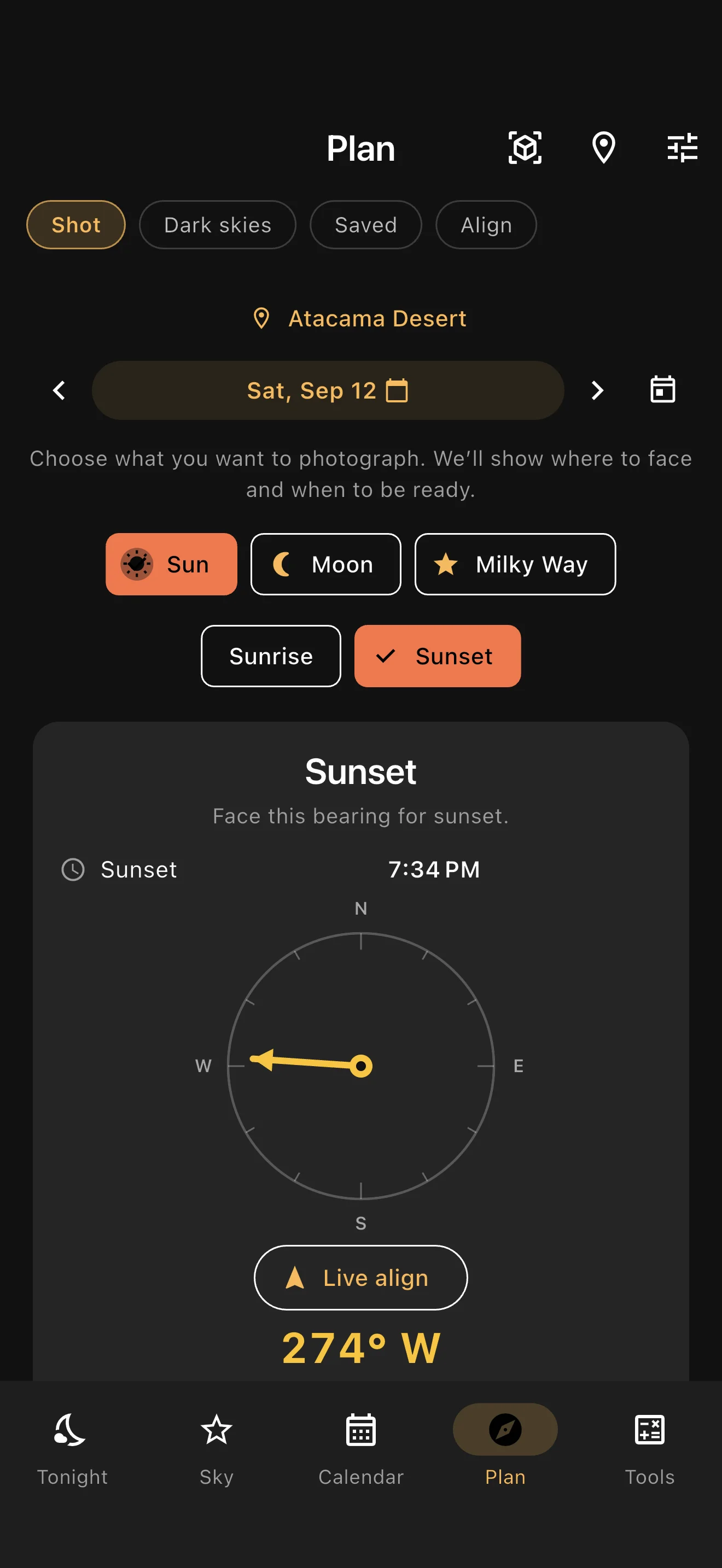
Shot planner showing a sunset time and compass bearing in the Atacama Desert.
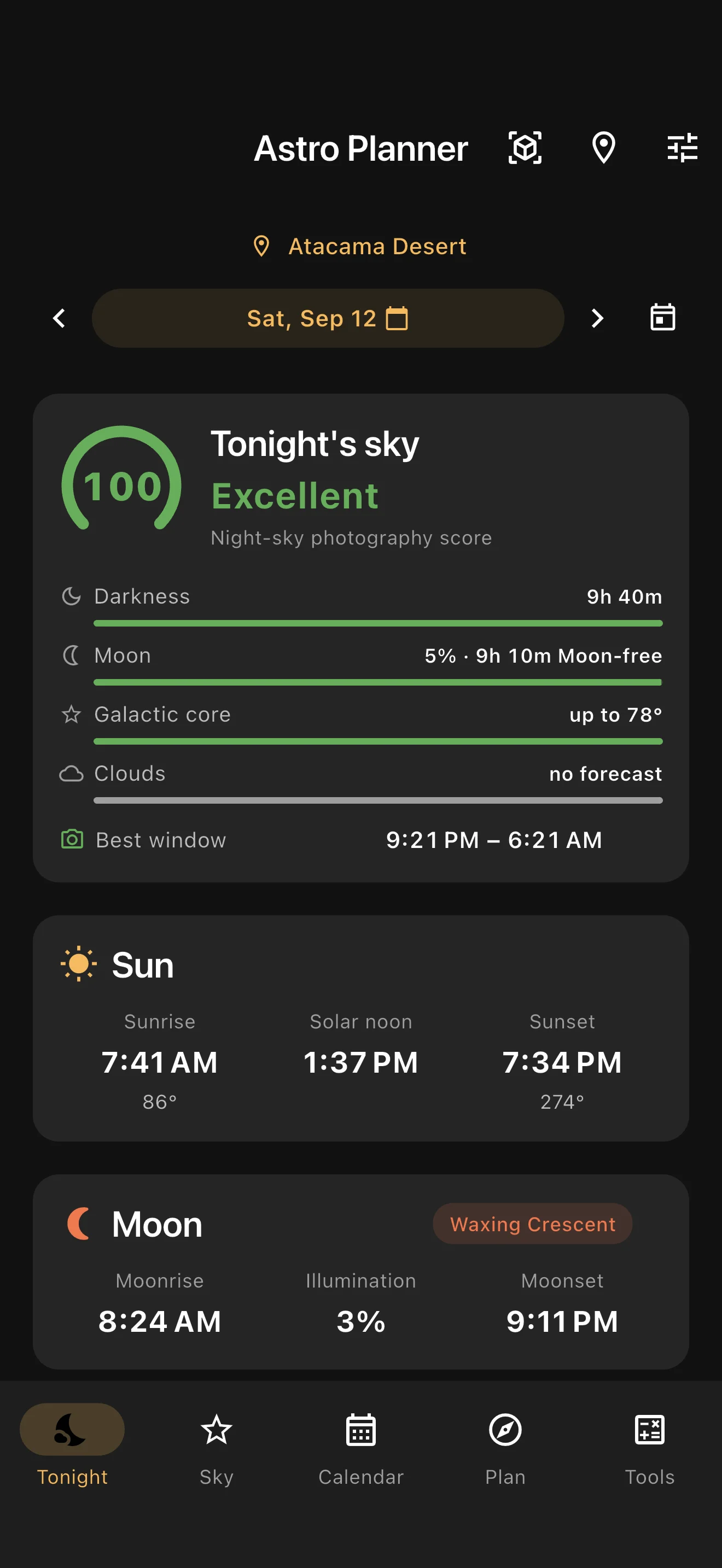
Astro Planner Tonight screen with a night score, Moon interference and the best dark window.
Real app screens · Atacama sample shoot
A good photo starts before you leave

Your next shot, already taking shape.

  1. Find your place

    Scout the dark-sky map and save the spots worth coming back to.

  2. Choose your moment

    Find a Moon-free window or the date the Sun lines up with your subject.

  3. Make it a plan

    Keep the place, time, target, camera rig and notes in one saved shoot.

  4. Go get the shot

    Set a reminder, check your bearing and preview celestial paths with Sky AR beta.

Inside your field kit

A place. A moment. A photograph.

Explore the tools that turn “one day” into a date on your calendar.

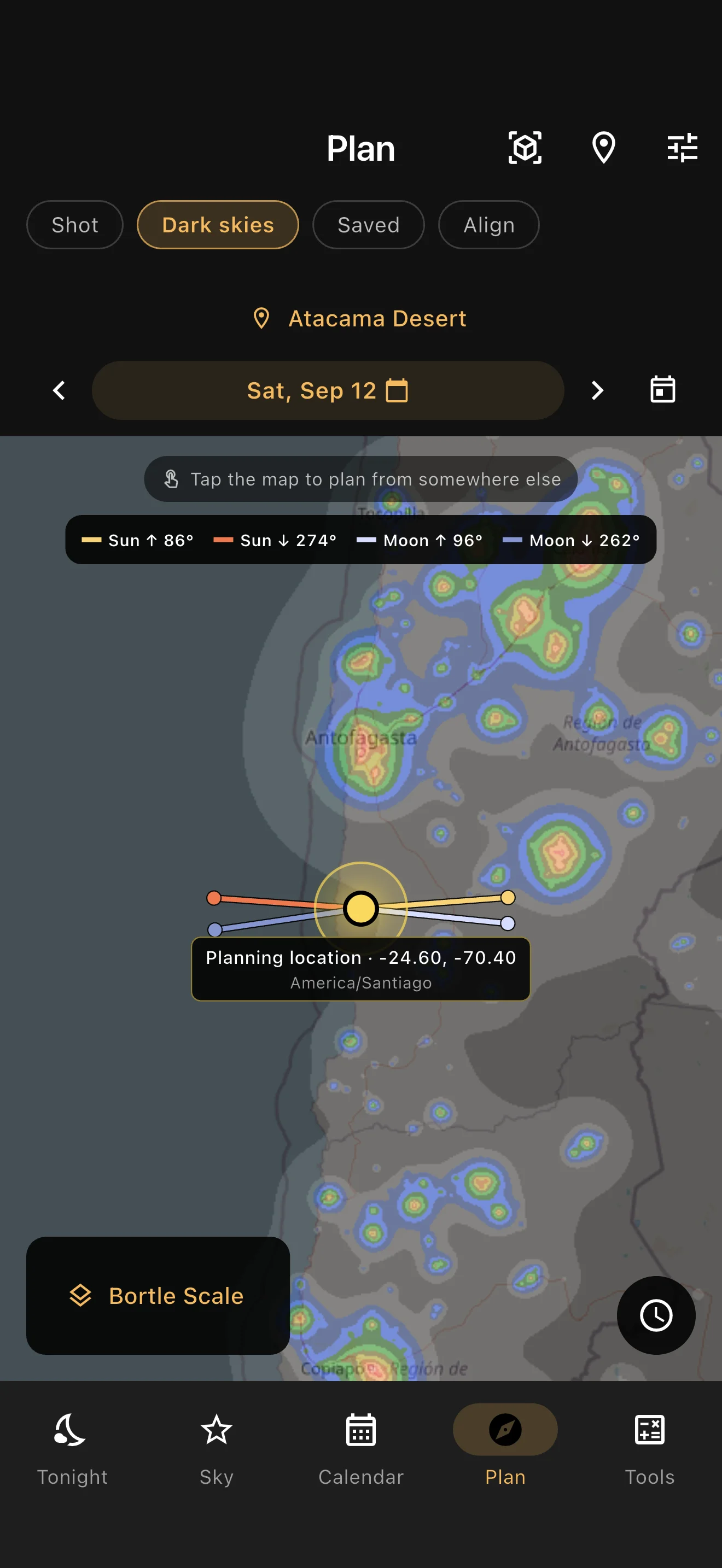
Dark-sky map with a light pollution overlay, planning location and Sun and Moon direction lines.
01 / Dark skies

Somewhere worth staying up for.

Explore light pollution, choose your observing location and see the Sun and Moon directions on the same map.

  • Save places you want to return to.
  • Scrub through the night to follow the Sun, Moon and galactic core.
  • Tap a landmark to start planning an alignment.
Get the app
Plan screen showing the selected sunset, its time and a compass pointing to the shot bearing.
02 / Alignments

The right light. In the right place.

That Moon above a ridge. That sunset behind a lighthouse. Choose a bearing and find the dates when the Sun or Moon meets your composition.

  • Search rise and set alignments across the coming year.
  • Choose an altitude above the horizon for your subject.
  • Use the shot compass to follow the planned bearing in the field.
Get the app
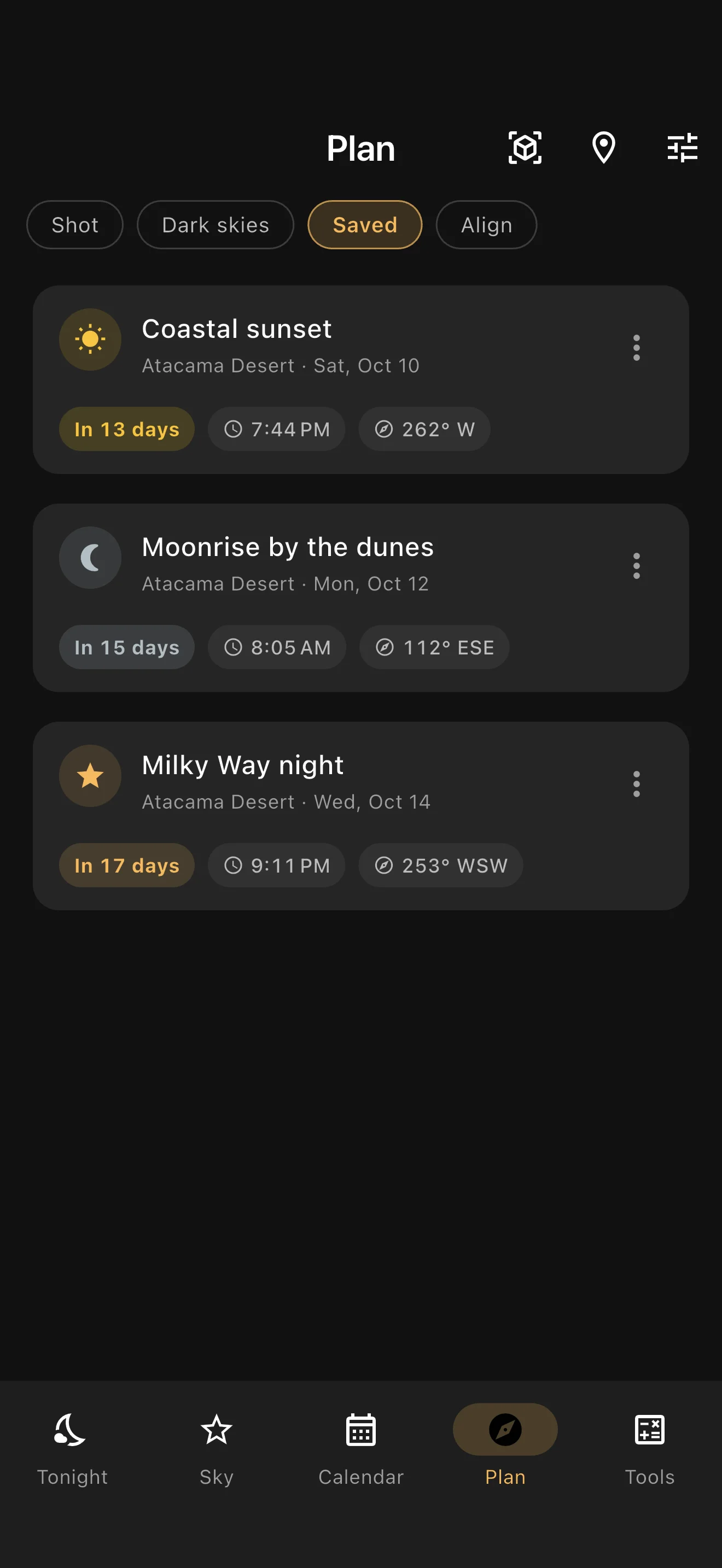
Saved shoots list with a coastal sunset, moonrise by the dunes and a Milky Way night.
03 / Saved shoots

Keep the idea. Remember the moment.

Save your place, night, target and notes together. Reopen a shoot and the app returns to that location and date.

  • Attach a camera rig and add a reminder.
  • See saved shoots on the Moon calendar.
  • Share the plan or add it to your calendar.
Get the app
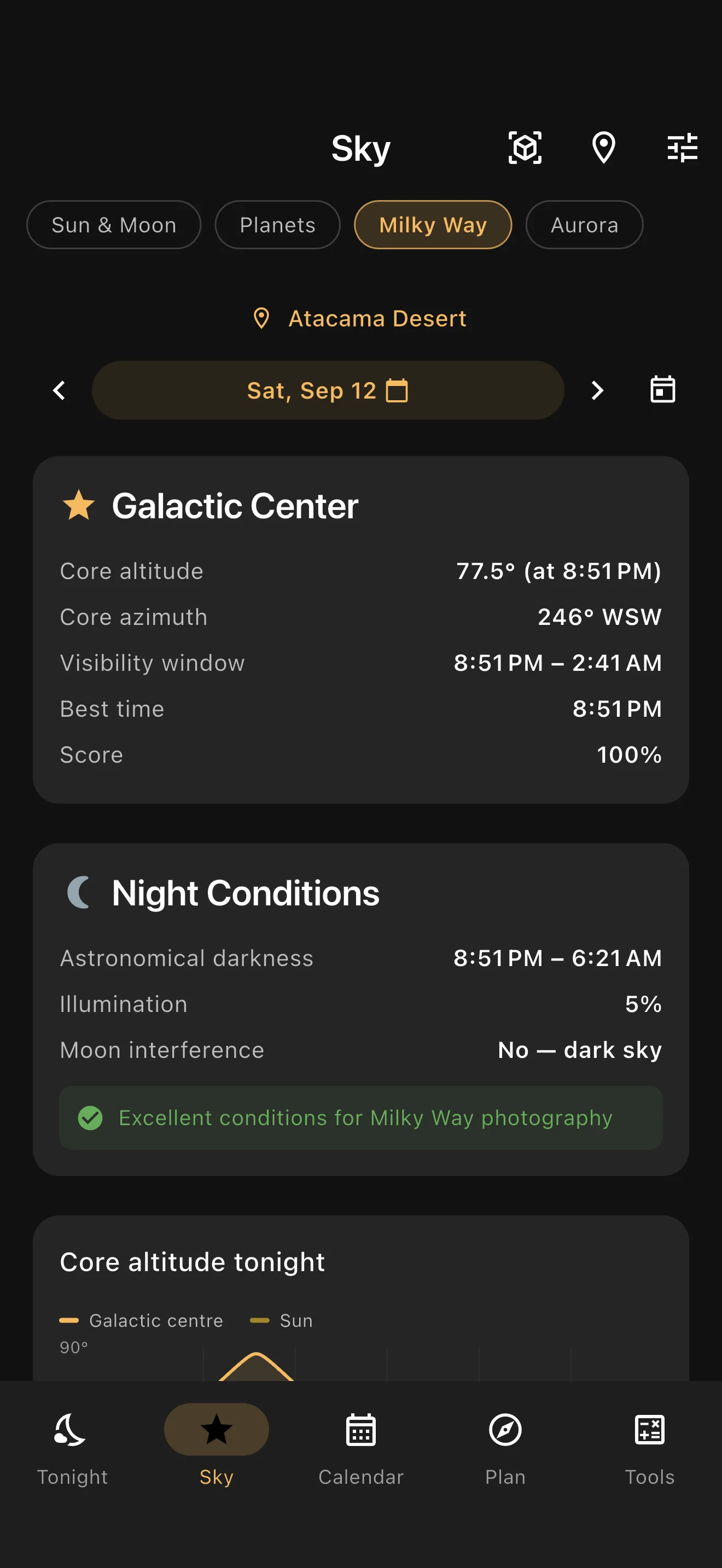
Milky Way screen showing galactic center position, visibility window and night conditions.
04 / Milky Way

Meet the core at its best.

See how high the galactic core climbs, when darkness arrives and how much the Moon gets in the way.

  • Follow the core’s altitude through the night.
  • Explore a full year of night-sky scores.
  • Jump straight to a promising night and plan from there.
Get the app
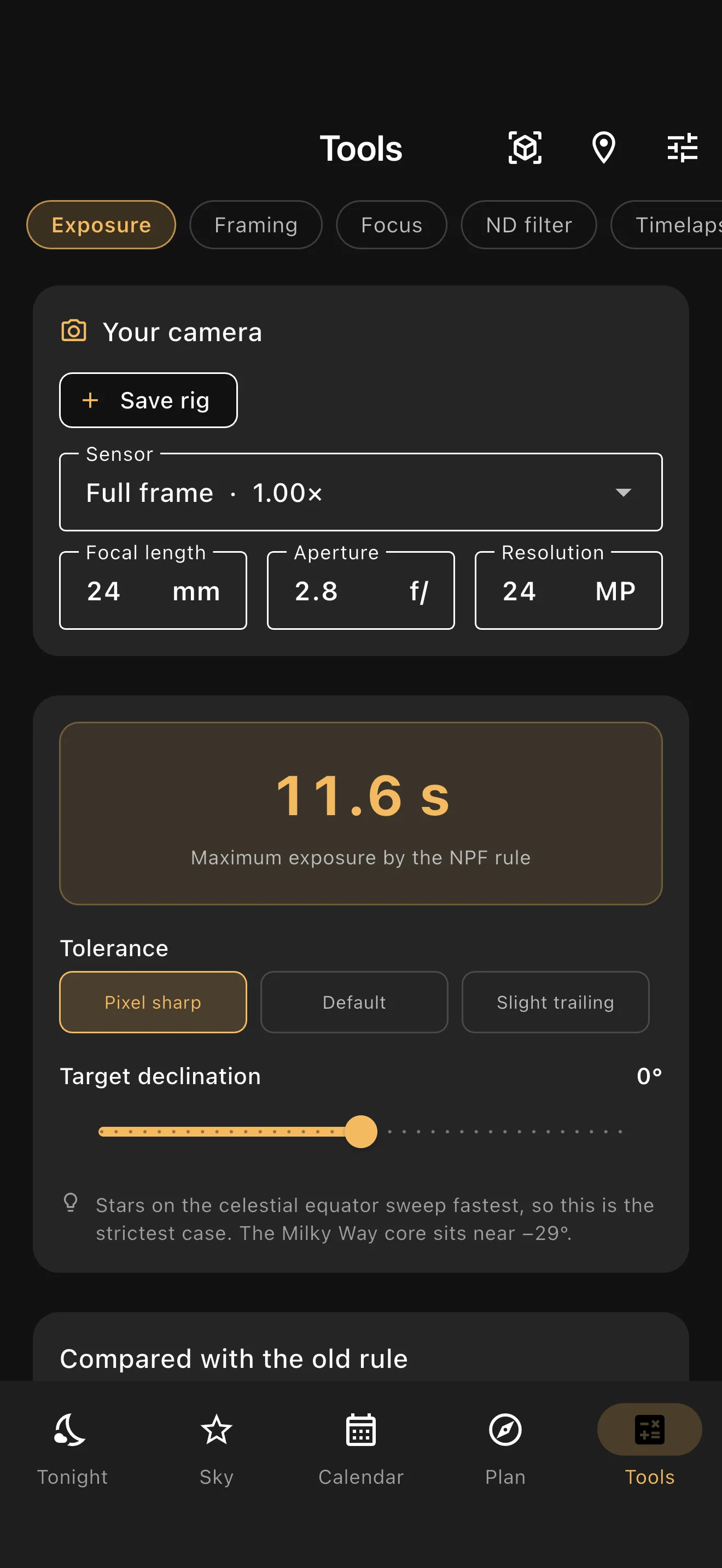
Camera tools screen with a saved full-frame camera setup and an NPF exposure calculation.
05 / Camera tools

Know your settings before it gets dark.

Save your camera and lens once. Put exposure, framing and focus calculations to work for your own setup.

  • NPF and 500-rule exposure calculators.
  • Field of view and depth of field.
  • ND filter and timelapse calculations.
Get the app

iPhone app screenshots with sample places and dates.

Sky AR · Beta

Look up. See the plan.

Preview the Sun, Moon and Milky Way core over your rear camera. Explore another time or date to see where your shot will be.

Uses camera, location and motion sensors. Calibrate in the field; accuracy depends on your device and surroundings.

Follow the lightHorizon
Celestial path illustration
— The night, at a glance

Keep an eye on what matters.

From tonight’s conditions to the next aurora forecast, your field kit stays close at hand.

Tonight’s score

Darkness, Moon interference and galactic core altitude in one rating, with cloud cover when a forecast is available.

Sun, Moon & golden hour

Rise and set times, compass directions and golden and blue hour windows for your chosen place and date.

A calendar with your plans

Browse lunar phases and illumination, and see your saved shoots on the nights you picked.

Widgets, ready at a glance

Moon Tonight, Sky Tonight, Next Shoot and Aurora Kp on your Home Screen. Lock Screen widgets on iOS, too.

A nudge for a good night

Turn on night alerts for promising conditions at your last observing location, plus reminders for saved shoots.

Aurora forecasts & alerts

Check NOAA’s current Kp and three-day forecast. Set a threshold to get an alert when aurora activity picks up.

— Built for the field

Made for places with more stars than signal.

Sun, Moon, Milky Way and camera calculations run on your device. Saved shoots and places stay with you. Load map areas while you have signal; fresh map tiles, cloud forecasts and aurora readings need internet.

  • Sun & moon mathOn-device · Meeus algorithms
  • Golden + blue hourOn-device · sun altitude
  • Moon phase calendarOn-device · synodic period
  • Milky Way visibilityOn-device · sidereal time + GC altitude
  • Light pollution tilesInternet for new areas · previously loaded tiles may be cached
  • Aurora Kp dataLive · NOAA Space Weather Prediction Center
  • Cloud forecastsOnline · Open-Meteo · optional in Settings

Before you head out

Does Astro Planner work offline?

Astronomical calculations, camera tools and saved plans work on your device. New map tiles, cloud forecasts from Open-Meteo and aurora data from NOAA need internet. Previously loaded map tiles may be cached; load the area you need before leaving. You can turn cloud forecasts off in Settings.

Does the night score include weather?

When a cloud forecast is available and enabled, it is included in the nightly score. Otherwise the score uses astronomical conditions alone and the app labels it accordingly. The year-ahead Milky Way view uses astronomical conditions, without weather forecasts.

What do I need for Sky AR?

A supported phone with a rear camera, location and motion sensors, with the relevant permissions enabled. Sky AR is in beta. You can adjust time and date and calibrate the overlay; alignment accuracy varies with your device and surroundings.

Is there a subscription?

No. Astro Planner is a one-time purchase with no in-app purchases, ads or account required. Check your store for the current local price.

— One purchase. Your whole field kit.

Have a shot in mind? Make a night of it.

All the planning tools. No subscription, no ads, no account. Available in English and Portuguese.

See your local price on the App Store or Google Play.